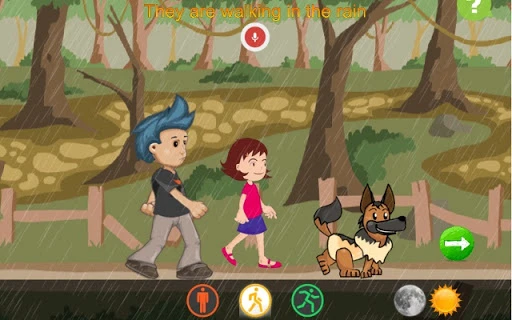

Interactive English Story Builder
Overview
Interactive English Story Builder is a free desktop application designed to enhance English comprehension through immersive, choice-driven storytelling. Targeted at learners of all levels, the software enables users to engage with narrative content by making decisions that shape the story’s direction. Each choice prompts users to construct sentences based on contextual clues, reinforcing vocabulary retention and grammatical structure in a natural, interactive environment.
The app operates on a simple yet effective principle: learning by doing, aligning with the educational philosophy that active participation leads to deeper understanding. It is particularly suited for language learners seeking a dynamic alternative to traditional study methods. The software supports both Windows and Mac platforms, making it accessible to a broad user base.
While the developer has not provided additional details about their background or development history, the app’s focus on interactive learning suggests a pedagogical design approach. Real-world usage scenarios include self-paced language study, classroom integration for educators, and casual learning for individuals interested in storytelling and creative writing.
Key Features & Capabilities
- Interactive Story Pathways – Users influence the story’s progression by selecting different actions for the character, promoting active engagement and decision-making in English.
- Contextual Sentence Construction – The app provides narrative clues that guide users in forming meaningful sentences, helping them practice grammar and vocabulary in real-time.
- Free and Ad-Free Experience – The software is completely free with no hidden fees, advertisements, or in-app purchases, ensuring uninterrupted learning.
- Simple, Intuitive Interface – Designed with minimal complexity, the user interface allows quick onboarding and smooth navigation, ideal for learners of all ages.
- Story Creation Functionality – Users can generate short narrative segments based on prompts, fostering creativity and language application.
These features support a hands-on learning experience where users not only absorb language but also apply it. For example, a user might choose whether a character should run or hide in a tense scene, then type a sentence explaining their choice. This process strengthens both comprehension and expressive skills. The app’s focus on interactive acts ensures that learning remains engaging and relevant, transforming passive reading into active participation.
User Interface, Workflow & Performance
The user interface is clean and minimal, emphasizing functionality over visual complexity. Navigation is straightforward, with clear prompts guiding users through each stage of the story. The workflow follows a linear but branching structure, allowing users to explore different narrative outcomes based on their choices.
The app maintains consistent responsiveness, though exact performance details were not specified. The developer did not provide information on CPU or RAM usage, so resource behavior remains unknown. Stability is assumed to be adequate for a preview release, but long-term reliability cannot be confirmed without further testing.
The software operates without visible lag during typical interactions, suggesting efficient handling of user input. Overall, the workflow supports a smooth learning experience, enabling users to focus on language development rather than technical challenges. The lack of advertisements or intrusive elements contributes to a distraction-free environment, enhancing user concentration and engagement.
Compatibility & System Requirements
Interactive English Story Builder is compatible with both Windows and Mac operating systems. The software version is 1.0.0, with a download size of 200MB. While the app is designed for desktop use, exact system requirements such as minimum processor speed, RAM, or storage space were not listed by the developer.
The developer did not specify whether the software requires internet connectivity or if it functions fully offline. Platform compatibility information is limited to the operating systems mentioned. Users should ensure their system meets general desktop application standards to run the software successfully.
The absence of detailed requirements means that installation and operation may vary depending on individual hardware configurations.
Pros and Cons
Pros
- Completely free with no ads or fees
- Interactive, choice-based learning improves engagement
- Simple interface suitable for learners of all levels
- Encourages active language use through sentence construction
- Supports both Windows and Mac platforms
Cons
- Exact system requirements were not specified
- Performance under heavy usage is unknown
- Developer background not disclosed
- Limited information on story content or depth
- Offline functionality not confirmed
FAQ Section
Is Interactive English Story Builder free to use?
Yes, the software is completely free with no hidden costs, advertisements, or in-app purchases.
Which operating systems does it support?
Interactive English Story Builder is compatible with Windows and Mac operating systems.
Does the app require an internet connection?
The developer did not specify whether the app requires online access. It may function offline, but this has not been confirmed.
Can I use this tool for classroom teaching?
Yes, the interactive nature of the app makes it suitable for educational settings, including classroom use by teachers and group learning activities.
How often are updates released?
Information about update frequency was not provided. Users should check the official source for the latest version.
Final Thoughts
Interactive English Story Builder offers a fresh and engaging approach to language learning by combining storytelling with practical English application. Its free, ad-free model removes common barriers to access, making it ideal for students, educators, and casual learners. The interactive framework encourages users to think critically and express themselves in English, reinforcing comprehension and fluency.
While some details such as system requirements and long-term performance remain unspecified, the core experience is promising for a preview release. For anyone seeking a creative, hands-on tool to improve English skills, this app delivers a meaningful and enjoyable learning journey. The emphasis on active participation aligns with proven educational principles, making it a valuable addition to any language learning toolkit.
Download Interactive English Story Builder now







